tech
Sep 10, 20266 min read
Apple Watch Listening Features: What You Need to Know
Apple Watch listening features explained: data privacy, security, and how to use them safely.


Based on reporting by Wired Science & Security Infrastructure. Research, structure, and fact-checking by Groundwork.
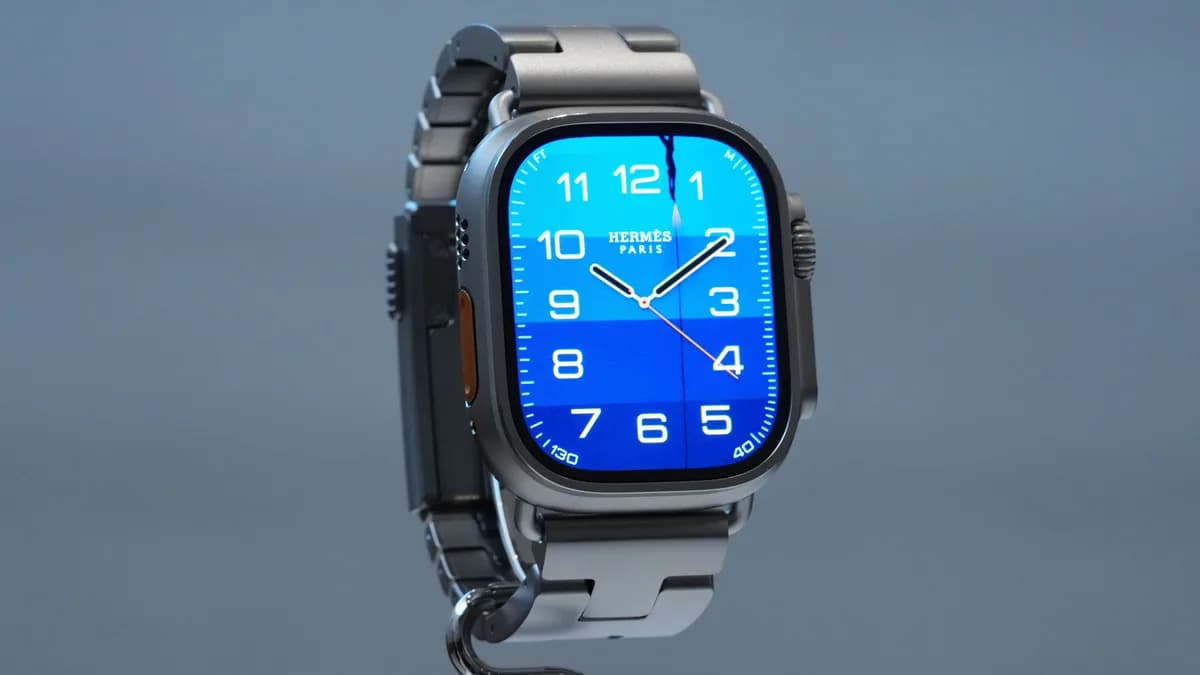
Apple Watch Listening Features: What You Need to Know
As you consider purchasing the new Apple Watch Series 12 or Ultra 4, you may be wondering about the listening features that have been integrated into these devices. Apple has made significant efforts to address concerns around data privacy and security, but it's essential to understand exactly how these features work.
The new Apple Watch listening features do not create or store audio recordings, and raw audio used for processing is completely inaccessible to the operating systems, apps, the user, or Apple.
How Apple Watch Listening Features Work
The Apple Watch features are designed to process as much data locally on devices as possible, so potentially sensitive data doesn’t go to the cloud. This is made possible by the new S11 chips, which include a special memory-protected space that Apple calls the Secure Exclave. This isolated buffer is inaccessible to the rest of the operating system and is where Apple Watch can hold and process audio data in a protected space.
Sound Recognition
Sound Recognition is a feature that alerts users about sounds in their environment, including doorbells, sirens, alarms, or a baby crying. This feature works without sending any data off the watch, as the tools that do send information out to the cloud preprocess the data so it isn’t raw audio files. Instead, Apple’s Private Cloud Compute infrastructure is used to identify the sounds.
Shazam Feature
The new Shazam feature “listens” for music and will generate a signature of a song that is stored in the Secure Exclave. If the user navigates to Shazam to find out what the music is, the tool will send that signature—not an audio file—to Shazam’s servers for identification. If the user doesn’t prompt to identify the music, or as soon as they do, the special signature is “immediately” deleted from the watch.
Siri Recap
The recap feature, known as Siri Recap, can be set to be on all the time and generate recaps of any substantive conversation, or it can be given a schedule to listen in at certain times during the day. A dedicated AI model determines when speech is occurring without recording or transcribing any data. If it detects a conversation, audio goes into a protected buffer within the Secure Exclave on the Apple Watch, the watch encrypts it, and then transmits it using Apple’s special secure Bluetooth pairing to the Secure Exclave on a user’s iPhone. Then the audio is immediately deleted from the Apple Watch.
iPhone Processing
The iPhone uses local speech recognition and language models on-device to transcribe the audio and then generate a minimal version of the transcript that removes nonessential elements like extra words and repeated phrases. Then the raw audio is immediately deleted from the iPhone as well. The last step on the iPhone is a safety model that “screens the text to omit potentially harmful terms,” according to Apple. From there, the distillation of the conversation is encrypted, and the iPhone sends it out to Private Cloud Compute.
Additional Context
Contextual information is also sent to improve summary quality. For example, Now Playing data helps the model understand that speech may have originated from music or a podcast. Calendar data can help generate accurate titles of summaries. High-level location labels such as home, work, and school, along with locality information such as city, state, and country, add context to the summarization. Point-of-interest categories like ‘grocery store’ or ‘park’ may also be included.
How to Use Apple Watch Listening Features Safely
While Apple has made significant efforts to address concerns around data privacy and security, it's essential to understand how to use these features safely.
1. Review Apple’s Data Privacy Policy
Before using the Apple Watch listening features, it's essential to review Apple’s data privacy policy. This will give you a clear understanding of how your data is collected, stored, and used.
2. Enable Data Deletion
Make sure to enable data deletion on your Apple Watch and iPhone to ensure that any sensitive data is immediately deleted after processing.
3. Use Secure Bluetooth Pairing
When transmitting data from the Apple Watch to the iPhone, use Apple’s special secure Bluetooth pairing to ensure that the data is encrypted and secure.
4. Monitor Your Data
Regularly monitor your data to ensure that it is not being collected or stored in a way that makes you uncomfortable.
The new Apple Watch listening features are designed to provide users with a more convenient and connected experience, while also addressing concerns around data privacy and security. By understanding how these features work and taking steps to use them safely, you can enjoy the benefits of the Apple Watch without compromising your data.
Share via system sheet on mobile, or copy link on desktop
S
Editorial Analysis
Sofia Reyes • Tech & Privacy Analyst
“Apple's efforts to address concerns around data privacy and security are commendable, but it's essential for users to remain vigilant and monitor their data to ensure that it is not being collected or stored in a way that makes them uncomfortable.”
Frequently asked questions
Do the Apple Watch listening features create or store audio recordings?▼
No, the Apple Watch listening features do not create or store audio recordings, and raw audio used for processing is completely inaccessible to the operating systems, apps, the user, or Apple.
How does the Shazam feature work?▼
The Shazam feature generates a signature of a song that is stored in the Secure Exclave. If the user navigates to Shazam to find out what the music is, the tool will send that signature—not an audio file—to Shazam’s servers for identification.
What happens to the audio data after it is processed?▼
The audio data is immediately deleted from the Apple Watch and iPhone after processing.
How does Siri Recap work?▼
Siri Recap uses a dedicated AI model to determine when speech is occurring without recording or transcribing any data. If it detects a conversation, audio goes into a protected buffer within the Secure Exclave on the Apple Watch, the watch encrypts it, and then transmits it using Apple’s special secure Bluetooth pairing to the Secure Exclave on a user’s iPhone.
What is contextual information, and how is it used?▼
Contextual information is sent to improve summary quality. For example, Now Playing data helps the model understand that speech may have originated from music or a podcast. Calendar data can help generate accurate titles of summaries. High-level location labels such as home, work, and school, along with locality information such as city, state, and country, add context to the summarization.
How can I use the Apple Watch listening features safely?▼
Review Apple’s data privacy policy, enable data deletion, use secure Bluetooth pairing, and monitor your data to ensure that it is not being collected or stored in a way that makes you uncomfortable.
What are the benefits of using the Apple Watch listening features?▼
The Apple Watch listening features provide users with a more convenient and connected experience, while also addressing concerns around data privacy and security.
How can I troubleshoot issues with the Apple Watch listening features?▼
Check Apple’s support website for troubleshooting guides and contact Apple support if you need further assistance.
Related research guides

tech
3m
Six Chinese AI Firms Accused of Aggressively Copying US Frontier Models
The US government has identified six Chinese AI firms that have been aggressively copying US frontier models, potentially saving billions in Chinese
G
Groundwork Researcher
tech
3m
The Menu Is an Execution Prior: State-Path Tool Menus for Online Agents
The State-Path Tool Menu is a novel approach to tool menu design that learns the state path and provides a complete and efficient tool menu for online agents,
G
Groundwork Researcher
tech
3m
An Autonomous GeoAI Agent for Arctic Eco-Navigation
An autonomous GeoAI agent for Arctic eco-navigation integrates operational, physical, ecological, and community-related criteria within a unified routing
G
Groundwork ResearcherRelated Research & Topic Index (tech)
Explore related evidence-based investigations, decision tools, and entity breakdowns:
Primary Research & Citations
Contextual evidence and verified documentation referenced in this research guide
Groundwork enforces a strict, independent verification standard. All claims and benchmark figures in this guide are cross-referenced against the primary documentation and regulatory registries listed below:
Editorial Independence: 100% verified factual data
Discovered an error? Submit for verification
How to Cite This Research Guide
Sofia Reyes (2026). Apple Watch Listening Features: What You Need to Know. Groundwork. Retrieved from https://gworky.com/article/apple-watch-listening-features-explained
License: CC BY-NC 4.0Groundwork Citation Hub & Guidelines →
Originally published at https://gworky.com/article/apple-watch-listening-features-explained — Groundwork Evidence-Based Research.
Featured Utility & ResearchGroundwork Intelligence
Software & Cloud Optimization
SaaS & Cloud Subscription Stack Auditor
Uncover forgotten seat licenses, redundant cloud services, and recurring overhead.
Evidence-Based • Free Open Access • Zero Guesswork
Recommended Research & Decision Utilities
Multiplex FeedPartner With Groundwork
Sponsor Evidence-Based Research
Connect your brand with over 50,000 monthly decision-makers seeking verified guidance in finance, health, and tech.
View Media Kit Verified
Interactive Utility
AI API Pricing Calculator
Compare estimated monthly cost across leading AI models based on your token usage.
Launch Tool→
 tech
techSix Chinese AI Firms Accused of Aggressively Copying US Frontier Models
6 min readRead Guide →
techThe Menu Is an Execution Prior: State-Path Tool Menus for Online Agents
4 min readRead Guide →
 tech
techAn Autonomous GeoAI Agent for Arctic Eco-Navigation
4 min readRead Guide →
 tech
techSubagents vs Agent Skills: Executing Reusable Knowledge for Long-Horizon Agentic Tasks
5 min readRead Guide →
Benchmarked TECH Solutions At a Glance
Evaluated for performance, privacy protocols, and pricing transparency.
| Solution | Key Benchmark | Pricing | Verdict & Access |
|---|---|---|---|
NordVPNEditor Pick via Nord Security | Audited WireGuard no-logs protocol | $3.39/mo | |
ExpressVPN via Express Technologies | Lightway protocol, RAM-only servers | $6.67/mo | |
Cloudflare WARP+ via Cloudflare Inc. | Fast Argo edge routing | $4.99/mo | Reference Benchmark |
Editorial integrity: Groundwork rates products independently without sponsor influence.More Comparisons →
Written byLead AnalystPrimary Research
Tech & privacy analyst covering smart-home security, data ownership, and AI tools. Sofia benchmarks products against real threat models and total cost.
Fact-Checked byReview BoardIndependent Audit
Chloe Chen
Smart Home & Digital Privacy Analyst
Smart home and digital privacy analyst focused on data ownership, device security, and power efficiency of AI utilities and gadgets.
Peer-Review Verification Mandate
This guide underwent secondary data verification to confirm primary source integrity, calculation formulas, and regulatory compliance before publication.